I'm sorry I no longer update this site, for a newer update please visit ChakHelp-Ipa.blogspot.com, Thank you!
Showing posts with label 100% works. Show all posts

25 Jun 2011

City Friends Hack


City Friends working hack Ipod/Iphone

What you need :
1)City Friends on your IDevice
2)Ifile on your IDevice


Step 1: Log out of +plus account in your City Friends and play the tutorial *this is a important step* (if you played the game before). For new players, go into City Friends and play the tutorial before executing the hack

Step 2: Enter IFile on your Device

Step 3: Go into /var/mobile/applications/City Friend/Documents/p.json

Step 4: open it with Text

Step 5: Change any of the point you want, for example if you want cash, change the cash value to anything you like.

step 6: save it

Step 7: open the game and have fun! :]

Oh and remember that you only can use the hack only once for one +plus account. If you have already executed the Hack and logged into +plus. You wont beable to use the hack for that account.

21 Jun 2011

Ninja Saga for Idevice Weapon Hack/Cheat

Ninja Saga IPA: Weapon Hack (Damage and price)

*I do not recommended Hacking but for those Strong wanna be out there, this is for you. Hack at your own risk*
AGAIN all I'm doing is sharing, I'm just sharing a knowledge that I have found when I was messing around in Ifile

Alright, I'm gonna show you how to Hack Ninja Saga IPA Game.
Ninja Saga for IDevices are available in Itunes for Free. :D

What you need : 1) Jail-broken IDevice
2) IFile on your Device
3) NinJa Saga (Idevice version)


Follow the steps carefully

Step one: Open Ifile
Step two: Go into /var/mobile/applications/Ninja Saga/
Step three: Once in /Ninja Saga go into 'Ninja Saga.app' folder follow by 'Data'

For the Weapon Hack:

scroll down to 'weapons' enter the file


I'm just gonna show you one of the weapon which i would be Hacking
'Wolf Claw'
That weapon requires you to be lvl 20 and it costs 15000
You can change the value for any weapon files
The Data kept for 'Wolf Claw' is in WPN3005.plist.
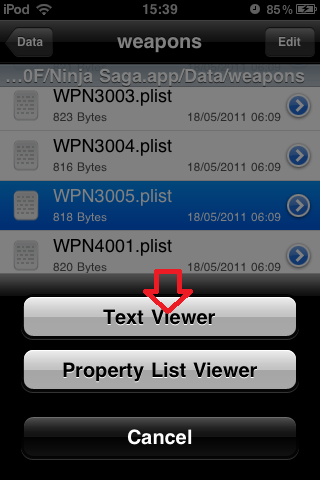
Open the file by pressing in the middle of WPN3005.plist


Open the file using 'Text Viewer'


Once in side, scroll down a little. You will find many values

Now what I'm gonna change is the Damage value, level requirement value and the gold value.
You can change any other values you like too


into this


Now remember to SAVE the changes


Press the home button, now enter Ninja Saga


Once in Game, go to 'SHOP'>'Buy'>'Weapons tab'
Find the Weapon that you have changed it values for buy and equip it


AND YOUR ALL DONE!! ENJOY!! :]
For you can even change Mission rewards, and Token cost of weapon to 0

Hope that I have helped you :]

Have a nice day people
Thanks to the 'Ninja Saga' developers for the nice game
Support the Ninja Saga buy buying their Tokens if you really like their game

:] Have a nice day!
-Chaker

19 Jun 2011

TinyChef Hack IPA

Hellooo :D
Want to be rich in your favourite Apple game? What to feel the richness in you??
Well you came to the right place :]
I will guide you step by step into hacking the game
Before that I have to say credit goes to BlIzZaRd from Xsellize,
Thats the man whom i learn the Hack from

Things you need:

1)Paros (click HERE for MAC _ Windows _ Linux)

2)A wifi router and a PC

Steps:

1)Once Paros is installed, launch Paros and find the configuration options. Paros is configured by default to listen on localhost only, but we need to do is route our iPhone’s traffic through Paros, so you need to set it to listen on the IP address of the interface connected to the same LAN as the iPhone. To do this once in Paros, go to tool then options> local proxy.

2)In the address of local proxy, key in your IPv4 address or your pc LAN-IP address. You can find your IP address in windows by using cmd, then typing ipconfig in cmd.
Once you have put in your 'address', for the port just use 8080


3)Now leave your computer for awhile and work on your ipod/iphone. In your IDevice go into 'setting' then Wifi Networks. Select the Wifi that your using and scroll down. Find HTTP proxy in your network, select Manual.
For server type in the IPv4 that you have used before
For port use 8080 which you have also used in Paros before


4)In Paros, go to "Tools - Options - Trap" and check "Use Inclusive Filter" and enter "http://tinychefgame.com/tapservice/api/" into the field, which is now available. Confirm the change with a click on "Ok"


5)In Paros, go to Trap and check the "Trap Response" checkbox and start "Tiny Chef"


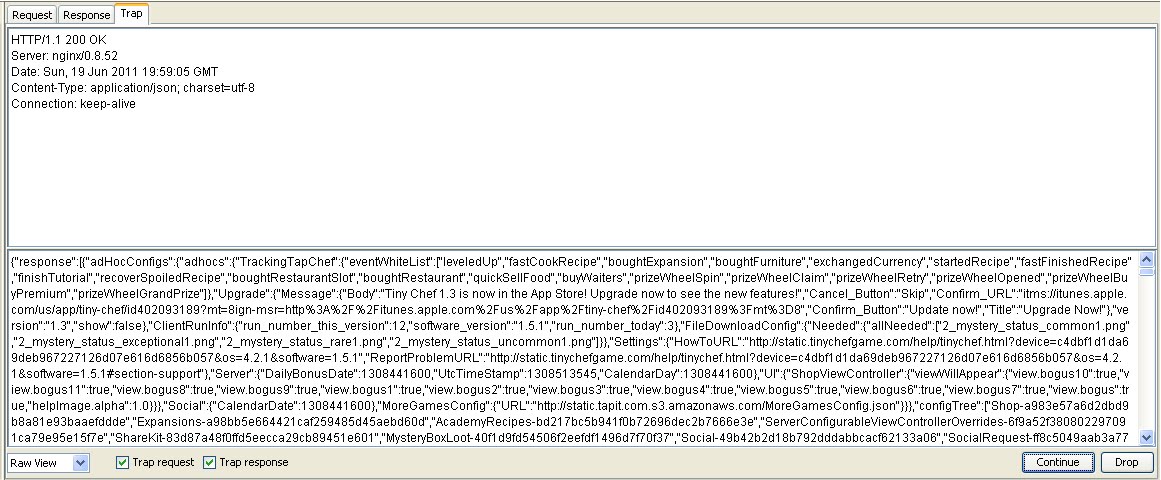
after starting Tiny Chef something like this will appear.


Just click continue and wait till you end up with this


6)Next just click on the big text and press Ctrl+F
To change your Coin type (coinsEarned\") change the value to what ever you like


To change your bucks type (spoonsEarned\") change the value to what ever you like


You can also change other many stuff such as levels, social levels.

8. Uncheck the "Trap Response" and "Trap request" Checkbox and hit continue. Go to your TinyChef and let it load.

The changes you have made should work


9)Go to settings in your IDevice and disable the HTTP Proxy. This is important as or else your game wont load the next time

ENJOYY!!! :]